Use case
Automating without over-engineering: lessons from a supply chain project
Power Automate and Azure to automate quotes for a supply chain company: −85% processing time, −94% errors, booking in under 2 minutes.
4 min readMouhcine EL HASNAOUI
- Power Automate
- Azure
- Event-Driven Architecture
- Supply chain
Monday morning, 8:15 a.m. A whole day for a single logistics operation.
Karim, a supply chain coordinator, receives an urgent order to ship before the end of the week. He opens Outlook, copies and pastes the details from an Excel file, and sends his quote requests by hand. Replies arrive in no particular order. He extracts the data, builds his comparison, and waits for his manager’s approval. At 5:45 p.m., a single logistics operation has taken up most of his day.
Now imagine the same process automated: the order is recorded, quote requests go out instantly, replies are consolidated, the manager approves in one click, and the carrier is notified. In under an hour. With no manual work.
This is not exceptional — it is what event-driven automation makes possible today. In this article, you will see how we implemented it for a supply chain client with Power Automate and Azure, from architecture design to go-live, with measured results.
The problem: when manual workflows cost more than you think
Delaying automation is no longer a neutral choice — it is a measurable competitive disadvantage. According to Gartner, 38% of companies already plan to move to intelligent automation for logistics, distribution and production within the next three years. Those that have not started this shift bear the gap — often without measuring it.
Our client handled its quote flows and operations manually. There were three concrete consequences:
- Processing times of 4 to 8 hours per quote.
- A data-entry error rate of 8% — each error triggering back-and-forth with carriers.
- No traceability at all: no way of knowing, at any given moment, where a request stood.
Workflow automation: the fundamentals
Single task vs complete workflow: two very different levels of value
Automating a task means sending a confirmation e-mail after a form is received. Automating a workflow means chaining steps: receive a file → validate the format → identify recipients → distribute → archive → notify the status. The gain is not linear, it is exponential.
Every automated workflow relies on the same three-stage model.
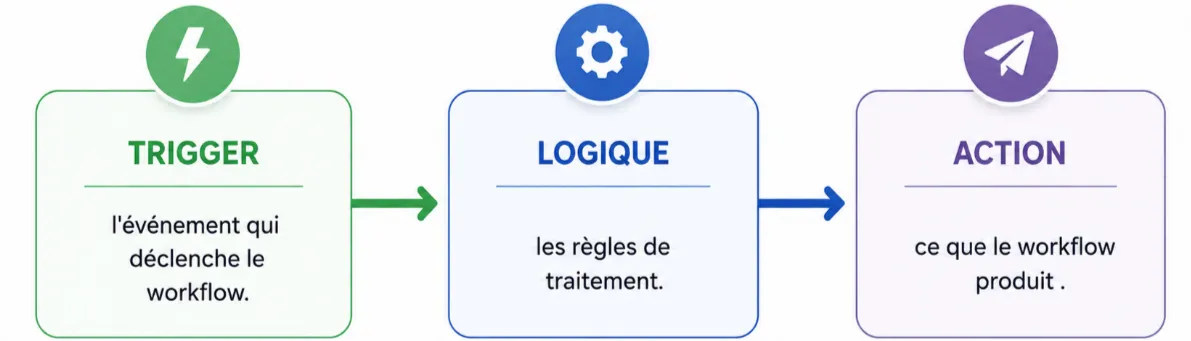
Event-driven architecture: why it changes everything
From scheduled automation to reactive automation
An event-driven architecture (EDA) is a model in which systems react to facts — events — rather than to schedules or direct requests.
Traditional automation is static: a flow runs at a set time, or when triggered manually. EDA makes automation reactive: the system acts as soon as something happens, without waiting.
Polling vs event-driven: choosing the right pattern for your context
This is the central architecture question. Event-driven is not always better than polling — they are two legitimate patterns with very different trade-offs. Choosing the wrong one is costly: either in latency (under-sized polling) or in operational complexity (over-sized EDA).
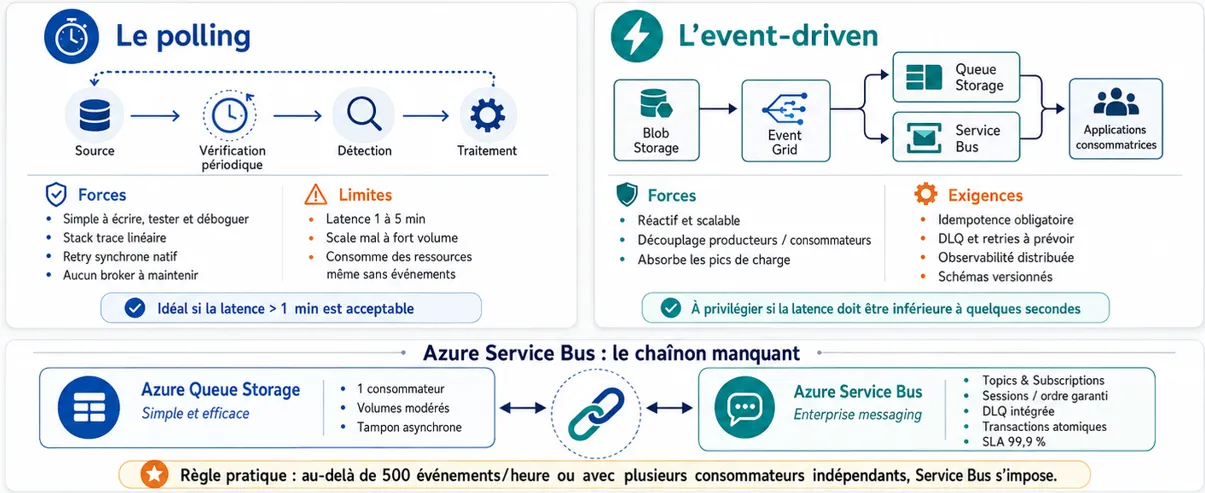
Polling or event-driven: the right choice depends on the expected latency, the volume of events and the number of consumers.
Our approach: start from the need, not the technology
At We Are Beebay, our starting point is never the technology. It is always the need.
Choosing a tool because it is fashionable means risking a solution that is technically correct but disconnected from the client’s real constraints. Our approach is to qualify each flow against the following criteria before recommending anything:
- Volume: how many events per day, with which foreseeable peaks?
- Criticality: what happens if a message is lost or processed late?
- Acceptable latency: can processing wait 5 minutes, or must it be near-instant?
- Existing ecosystem: which tools and licences are already in place?
- Operational complexity: what event-driven requires in production.
The chosen architecture: a six-step pipeline
The architecture below shows one possible answer to this type of problem. In this project, the choices made reflect trade-offs between responsiveness, maintainability and operational simplicity, taking into account business constraints and the existing ecosystem. The result is a hybrid six-step pipeline, combining event-driven mechanisms and polling-based processing, from the moment a file is received to its use in the business application.
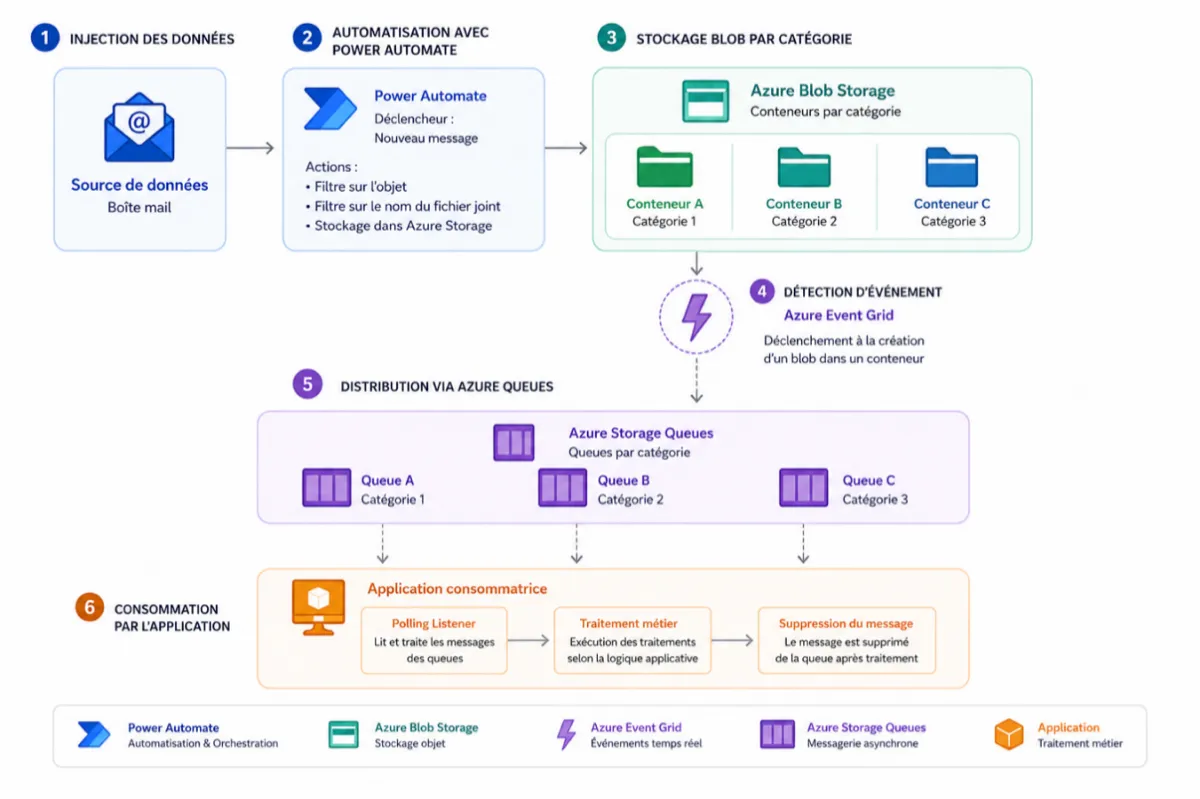
Hybrid six-step architecture, from data reception to business processing, with Power Automate and Azure services.
This choice came directly from analysing the client’s needs. Three criteria guided the decision:
- The daily volume of events remained moderate;
- A single consumer processed messages downstream;
- Latency constraints — a few minutes at most — were fully compatible with regular polling.
In this context, the extra operational complexity that Azure Service Bus would have introduced was not justified. Azure Storage Queues offered the simplicity, reliability and level of decoupling needed to meet the project’s requirements.
When Azure Service Bus becomes the right choice
In other contexts, step 5 could rely on Azure Service Bus Queues or Topics/Subscriptions instead of Azure Storage Queues, and step 6 would then use a Service Bus Listener rather than a Polling Listener. This switch is justified when the project has one of the following needs:
- Advanced decoupling: stronger isolation between the components of the architecture.
- Ordering guarantee: strict processing of messages in their order of arrival.
- Pub/Sub model: several independent consumers must process the same message (Topics/Subscriptions).
- High reliability: higher requirements for security, transactions and delivery guarantees.
Results: what the numbers say
After our automation pipeline went live and was integrated with the custom-built business application, here are the measurements observed on export and supply chain operations:
| Indicator | Before | After | Gain |
|---|---|---|---|
| Processing a pricing request | 4 to 8 hours | < 1 hour | −85% |
| Data-entry error rate | ~8% | < 0.5% | −94% |
| Booking time | Several hours | < 2 minutes | Real time |